

HCSA Claim Submissions: How to Claim, Deadlines & Carry Forward
Now that you’ve been introduced to your Healthcare Spending Account (HCSA), let’s walk through how to submit claims and how the timing rules work. Submitting claims through your HCSA is simple, and in many cases, it can be done in the same step as your regular benefit claim.
How to Submit a Claim
The fastest and easiest way to submit a claim is through the My Canada Life at Work website or mobile app, but if you prefer a paper submission, you still have that option. System updates will be in place for April 1st.
If an expense is covered through the base plan, claim as you would normally for the first part.
Example 1: Using Point of Purchase
- At the provider, the claim will go through the plan if you have provided them with your plan information under 44501. You pay for any amounts not covered.
- You can then easily take a picture of the receipt, upload it into the app or website and claim any out of pocket expenses against your HCSA balance. Alternatively, you can submit the receipt with a paper claim.
Example 2: Reimbursement
- Check the CRA website for claim eligibility or contact Canada Life.
- Pay for the expense.
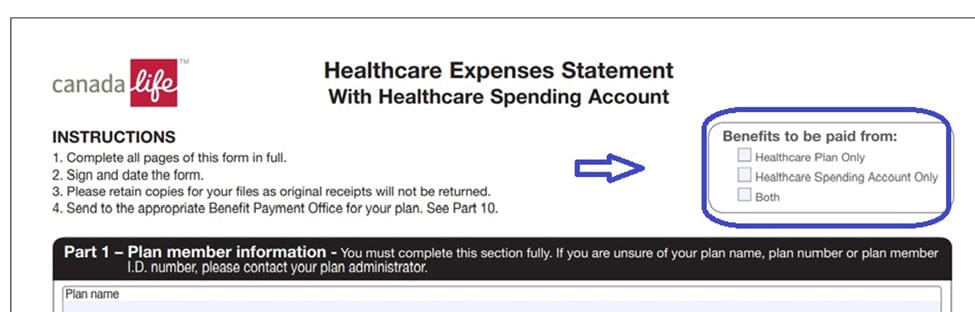
- Take a picture of the receipt, upload it into the app/website or submit the receipt with a paper claim. If you have an Explanation of Benefits that shows the amount paid include it. Indicate on the site or paper that you would like reimbursement from only the Healthcare Plan, only the HSCA or from both.
A sample of the claim form as of April 1st is below for your reference. The app and website will be similar.
Coordination of Benefits
If you, or your spouse have coverage under another benefits plan, you may still be able to reduce out-of-pocket expenses.
Typically, the order works like this:
- Submit the claim to your benefits plan first.
- Submit any remaining balance to the secondary plan.
- Any remaining eligible expense can then be submitted to your HCSA. Just include the receipt and Explanation of Benefits, if applicable showing the amount each plan paid.
- This process helps ensure you receive the maximum reimbursement available.
Understanding Balance Carry Forward
If you do not use all of your HCSA credits during the year, the remaining balance automatically carries forward to December 31st of the next plan year.
Key Rule:
- Unused credits can only be carried forward one year.
- If they are not used during that time, the remaining balance will expire.
- The balance carries forward but the claim date does not, you cannot use a new year’s budget for prior year claims.
| Period | Allocation | Total Available | HCSA Claims | Dec 31 Balance | Forfeit |
| Year 1 | $650 | $650 | $200 | $450 | $0 |
| Year 2 | $800 | $1,250(800+450) | $0 | $800 | $450 |
In this example, the $450 that was carried forward from Year 1 is forfeited, since it can only be carried forward one plan year.
You can check your HCSA balance anytime through My Canada Life at Work after April 1, 2026.
Claim Submission Deadlines
The health and dental claim submission deadline is unchanged at December 31, the year after the incurred date. A claim with a service date of June 2026 must be submitted by December 31, 2027.
The HCSA claim deadline is May 31st of the following year. A claim with a service date of June 2026 must be submitted by May 31, 2027.
The HCSA claim deadline is earlier than the base health and dental plan deadline, so it is your responsibility to ensure you are submitting claims timely if you plan on using your HCSA allotment.
Next week, we’ll explain some administrative details about the Healthcare Spending Account.